



Let's be real, staring at a massive list of the best laptops for nursing students is enough to make anyone's head spin. But finding the right one isn't just about convenience—it's your academic lifeline. A good laptop becomes your mobile command center for everything from running complex anatomy software to cramming digital textbooks on the go and taking those nerve-wracking proctored exams. This guide cuts through the noise and focuses on what actually matters when you're deep in a demanding nursing program.
Why Your Laptop Is a Critical Nursing School Tool
For a nursing student, a laptop is so much more than a fancy notepad. It's the partner that sticks with you through every part of your education, from early morning lectures to late-night clinical rotations. Think of it as the central hub for your entire, chaotic schedule of classes, simulation labs, and patient care assignments.
Honestly, this investment will directly impact how well you keep up. You need a machine that can handle specialized software for electronic health records (EHRs) and pharmacology databases without breaking a sweat. At the same time, it has to be light enough to toss in a bag and carry through endless hospital corridors, with a battery that can survive a 12-hour shift.
More Than Just a Gadget
Choosing the right laptop is a strategic move, not just a purchase. The pressure of nursing school is intense, and the last thing you can afford is a technical glitch or a dead battery when you're trying to submit an assignment at the last minute.
Your device has to be a reliable workhorse for:
- Running Simulation Software: Many courses use pretty demanding programs that simulate patient scenarios, and they need a decent amount of processing power to run smoothly.
- Secure Online Exams: Proctored exam software is notoriously picky and often has strict system requirements that older or budget machines just can't handle.
- Digital Research: You are going to spend countless hours digging through online journals, databases, and video lectures. A slow computer makes that process painful.
A dependable laptop just gets the tech out of the way so you can focus on what's really important: learning how to be a great nurse. It should be a tool that works for you, not against you.
Evolving University Requirements
As healthcare education gets more high-tech, a lot of universities are starting to lay down the law with specific laptop requirements. For instance, some nursing programs now mandate that every student has a modern PC or Mac with minimum specs for processing power and memory.
If you want a real-world example, check out the WVU School of Nursing’s upcoming laptop program to see how strict these requirements can be. If you don't meet these standards, you could actually risk being excluded from certain courses.
With all the hours you'll spend staring at a screen for coursework and research, digital eye strain is a real concern. If you start feeling that discomfort, this guide to glasses for eye strain computer use is a lifesaver. Taking care of yourself is just as important as picking the right tech.
Decoding Laptop Specs for Nursing Students
Alright, let's break down that wall of text on a laptop's spec sheet and translate it into what actually matters for your life as a nursing student. Think of this as your guide to cutting through the tech jargon so you can focus on the features that will genuinely make or break your day.
Getting this right isn't about buying the most expensive machine; it's about making the smartest choice for your specific needs. It's the difference between a laptop that feels like a trusty sidekick and one that’s a constant source of frustration.
Portability and Weight
As a nursing student, you’re always on the move. Your laptop is going to be your constant companion, from lecture halls to the library, simulation labs, and, most importantly, down long hospital corridors during clinicals. A heavy, clunky laptop becomes a real burden, fast.
Your target should be a device that weighs under 3.5 pounds. Ultrabooks and 2-in-1 hybrids are fantastic because they're built for exactly this kind of grab-and-go lifestyle. Trust me, every single ounce counts when it's sitting in your backpack during a 12-hour day.
The All-Important Battery Life
Picture this: you're frantically taking notes in a critical pharmacology lecture, or you're in the middle of charting patient data during a clinical rotation, and your screen goes black. Power outlets in classrooms and hospital common areas are notoriously scarce and always in high demand.
This is why battery life is an absolute deal-breaker.
Look for a laptop that promises at least 10-12 hours of real-world use on a single charge. This gives you the peace of mind to get through back-to-back classes and a full clinical shift without having to hunt for a power source.
Performance: CPU, RAM, and Storage
Performance specs can feel overwhelming, but they really just determine how smoothly your laptop can juggle your workload. Think of it like this: the CPU is the brain, the RAM is its short-term memory, and the storage is the long-term filing cabinet.
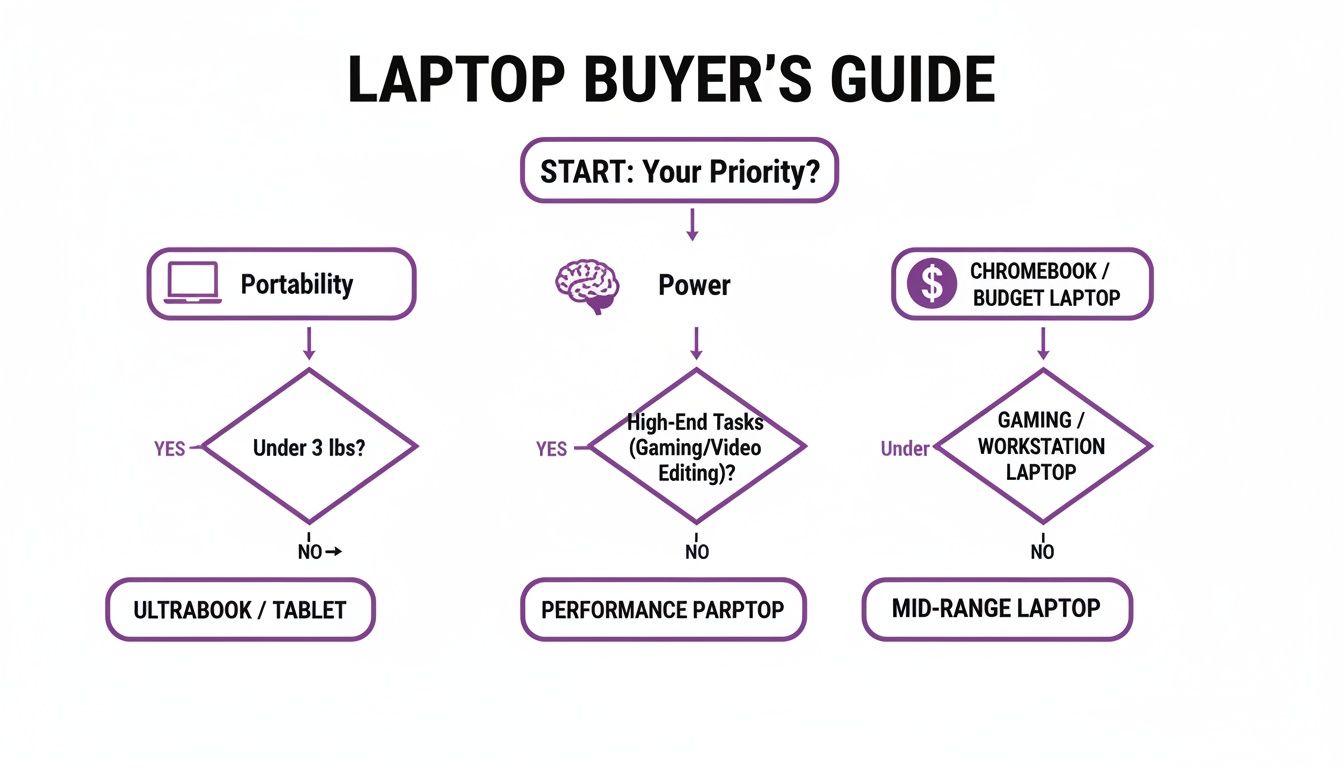
This flowchart really helps visualize how your main priority—whether that's being able to carry it anywhere, raw power, or just sticking to a budget—points you toward the right kind of machine. The main takeaway? You don't need to overspend on a performance beast if your biggest concern is portability.
- CPU (Processor): This is the engine that drives everything. An Intel Core i5 (or an AMD Ryzen 5) is a solid baseline that will run specialized nursing software and EHR simulations without frustrating lag.
- RAM (Memory): This is all about multitasking. 8GB is the bare minimum, but 16GB is strongly recommended. It’s what lets you have dozens of research tabs open, stream a lecture, and run a clinical simulation all at the same time without your computer grinding to a halt.
- Storage (Hard Drive): This is where all your files, from lecture notes to huge video assignments, will live. Always, always choose a Solid-State Drive (SSD) over an old-school Hard Disk Drive (HDD). SSDs are way faster and more durable, meaning your laptop boots up in seconds and is less likely to get damaged if it gets jostled in your bag. A 256GB SSD is a decent start, but 512GB gives you much more breathing room. If you're comparing options, a good guide to laptop hard drives can help clarify the differences.
Operating System: Windows vs. macOS
The Windows vs. macOS debate usually comes down to personal preference and, crucially, what your university requires.
Windows machines give you a much wider variety of hardware options across all price points. On the other hand, MacBooks are legendary for their user-friendly design, top-notch security, and how well they hold their value over time.
But before you make a final decision, the most important step is to check with your nursing program’s IT department. They’ll tell you if there’s any required software that only runs on one specific operating system. You don’t want to show up on day one with a laptop that can’t run the programs you need.
Here’s a quick-glance table to help you keep these key specs in mind while you shop.
Key Laptop Specs for Nursing Students at a Glance
Use this table as a quick checklist to compare laptops and ensure they meet the demands of a nursing program.
| Feature | Minimum Requirement | Recommended for Best Experience |
|---|---|---|
| Weight | Under 4 pounds | Under 3.5 pounds |
| Battery Life | 8-10 hours | 10-12+ hours |
| CPU (Processor) | Intel Core i3 or AMD Ryzen 3 | Intel Core i5 / AMD Ryzen 5 or higher |
| RAM (Memory) | 8GB | 16GB |
| Storage | 256GB SSD | 512GB SSD or more |
| Operating System | Check program requirements | Windows or macOS based on program needs and personal preference |
| Durability | Standard consumer-grade build | Metal chassis or MIL-STD-810G rated |
This cheat sheet simplifies what to look for, ensuring the laptop you choose is a reliable tool that supports you all the way through to graduation.
The 8 Best Laptops for Nursing Students Reviewed
Alright, now that you know what to look for, let's get into the good stuff. We’ve sifted through the noise to bring you our top 8 picks for nursing students—machines that perfectly blend power, portability, and the reliability you need to survive the program. Think of these reviews as a real-world rundown of how each laptop handles the chaos of nursing school, from juggling simulation software to surviving a 12-hour clinical shift.
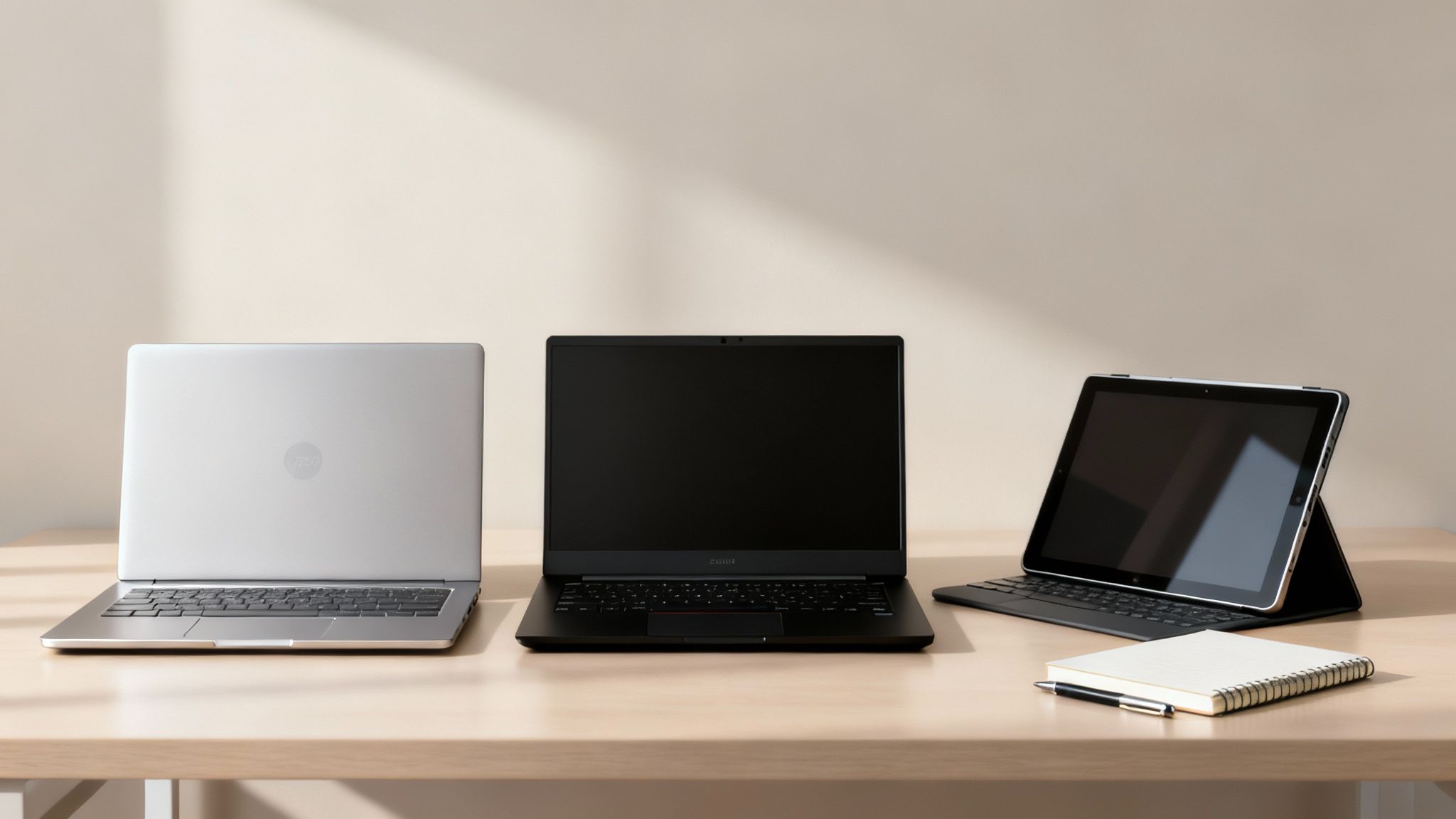
Our selections cover different budgets and operating systems, all available on Amazon. For each one, we'll break down exactly why it made the cut, then give you a no-nonsense list of pros and cons to help you choose with confidence.
1. Apple MacBook Air (M3)
The MacBook Air with the M3 chip is an absolute beast when it comes to efficiency and portability. It’s a favorite for students who just want something that works, no questions asked. The fanless design means it's dead silent—a massive bonus during a quiet lecture or a late-night cram session. But the real showstopper is the battery life. This thing is legendary, easily lasting an entire day of classes and clinicals on a single charge.
Pros:
- Exceptional Battery Life: Lasts up to 18 hours, letting you leave the charger at home.
- Incredibly Lightweight: At just 2.7 pounds, you'll barely notice it in your bag.
- Powerful Performance: The M3 chip handles any nursing school software with ease.
- Silent Operation: The fanless design means zero distractions.
Cons:
- Higher Price Point: It’s a significant investment compared to most Windows laptops.
- Limited Ports: You only get two Thunderbolt/USB 4 ports, so a dongle is often necessary.
- Less Upgradeable: RAM and storage cannot be upgraded after purchase.
2. Dell XPS 13
Often called the MacBook Air's biggest rival, the Dell XPS 13 is a powerhouse Windows machine packed into a sleek, professional-looking frame. The InfinityEdge display with its paper-thin bezels is stunning, making anatomical diagrams and video lectures incredibly immersive. It's built tough, so it can handle the bumps and scrapes of a busy student’s life.
Pros:
- Stunning Display: The high-resolution screen makes everything look crisp and clear.
- Premium Build Quality: The aluminum chassis feels durable and looks sharp.
- Compact and Lightweight: Easy to carry, weighing in at about 2.6 pounds.
- Strong Performance: Configurable with powerful Intel processors that won’t break a sweat.
Cons:
- Can Be Expensive: The price climbs quickly on higher-end configurations.
- Limited Port Selection: Relies heavily on Thunderbolt ports, so get ready for #donglelife.
- Average Webcam: It’s fine for online classes but isn't exceptional.
3. Microsoft Surface Pro 9
For the student who craves versatility, the Microsoft Surface Pro 9 is in a class of its own. It’s the ultimate hybrid, effortlessly switching between a zippy laptop and a hands-on tablet. Pop off the keyboard to mark up lecture slides or annotate anatomical charts with the Surface Slim Pen 2. This 2-in-1 design is perfect for the different environments you’ll find yourself in, from a lecture hall to the sim lab.
Pros:
- Unmatched Versatility: Functions as both a powerful laptop and an intuitive tablet.
- Excellent for Note-Taking: The optional Surface Pen feels incredibly natural for writing and drawing.
- Extremely Portable: Weighing just under 2 pounds, it’s a breeze to carry.
- High-Resolution Touchscreen: The PixelSense display is bright, sharp, and responsive.
Cons:
- Keyboard and Pen Sold Separately: These essential accessories add to the total cost.
- Awkward on Your Lap: The kickstand isn't as stable as a traditional laptop.
- Fewer Ports: You get two USB-C ports, but no headphone jack or traditional USB-A.
4. HP Spectre x360 14
The HP Spectre x360 14 is a gorgeous 2-in-1 that looks as good as it performs. Its 360-degree hinge lets you flip it into laptop, tent, or tablet mode, giving you options for any situation. The optional OLED display is a game-changer, with unbelievable color and deep blacks that make studying detailed medical images so much better. It's a true workhorse, handling multitasking and specialized software with ease.
Pros:
- Gorgeous OLED Display Option: The screen quality is incredible for the price.
- Flexible 2-in-1 Design: The 360-degree hinge is genuinely useful for studying and presenting.
- Premium Look and Feel: The build quality feels expensive and well-made.
- Excellent Keyboard: Comfortable for long typing sessions and research papers.
Cons:
- Can Run Warm: It can get a bit toasty under a heavy workload.
- Battery Life is Good, Not Great: It’s solid but might not last as long as a MacBook Air.
- Glossy Screen: The display can be reflective in bright rooms.
5. Lenovo Yoga 7i
The Lenovo Yoga 7i hits that sweet spot between performance, features, and price, making it a killer mid-range option. As a 2-in-1, you get the flexibility of a laptop for typing and a tablet for reading. It has more than enough power to handle a typical nursing student's workload and comes with a decent selection of ports, meaning fewer dongles to worry about.
Pros:
- Great Value for a 2-in-1: You get premium features for a more reasonable price.
- Solid All-Around Performance: It will handle all your essential nursing school tasks.
- Good Port Selection: Having both modern and legacy ports is a huge convenience.
- Comfortable Typing Experience: Lenovo is known for its great keyboards.
Cons:
- Slightly Heavier: At around 3.4 pounds, it’s a bit heftier than premium ultrabooks.
- Display Isn't as Bright: The screen is perfectly fine but doesn’t pop like more expensive models.
- Average Battery Life: It should get you through the day, but you might need an outlet by evening.
6. Acer Swift Go 14
If you're on a tighter budget but still need a reliable machine, the Acer Swift Go 14 is a fantastic find. This laptop delivers the essentials in a lightweight, affordable package. Its standout feature is the brilliant OLED screen, which is almost unheard of at this price and makes everything look amazing. Under the hood, modern processors keep things running smoothly for everyday tasks.
Pros:
- Excellent Value: Strong performance and a top-tier screen for a budget-friendly price.
- Beautiful OLED Display: A killer feature that makes content look stunning.
- Lightweight and Portable: Weighs about 2.76 pounds, so it’s easy to haul around.
- Good Selection of Ports: Connect your devices without needing an adapter.
Cons:
- Build Quality is Good, Not Premium: It’s mostly plastic and doesn't feel as sturdy as metal laptops.
- Subpar Webcam and Speakers: They get the job done, but that’s about it.
- Battery Life is Just Okay: It will get you through classes but maybe not a full day of heavy use.
7. HP Pavilion Aero 13
The HP Pavilion Aero 13 is for the student who lives out of their backpack. Weighing a ridiculously light 2.2 pounds, it’s one of the lightest laptops out there. Despite being a featherweight, it packs a serious punch with powerful AMD Ryzen processors that can handle demanding coursework. The screen is another highlight, with a taller 16:10 aspect ratio that gives you more room to read documents.
Pros:
- Extremely Lightweight: At just 2.2 pounds, it’s a dream to carry.
- Powerful AMD Performance: The Ryzen chips deliver excellent speed for multitasking.
- Bright, Tall Display: The 16:10 screen is great for productivity.
- Affordable Price: You get ultrabook features without the ultrabook price.
Cons:
- Feels Less Premium: The build is durable enough but can feel a bit plasticky.
- Keyboard Can Feel Spongy: Not the most satisfying for typing long essays.
- Average Battery Life: You'll definitely need your charger on long days.
8. ASUS Zenbook 14
Sleek, powerful, and well-rounded, the ASUS Zenbook 14 is an awesome all-arounder for any nursing student. It sports a jaw-droppingly beautiful OLED display that makes everything look incredible. The Zenbook is also known for its slim, all-metal body that’s both lightweight and durable. Performance is fantastic, and with long battery life and a premium feel, it's a complete package.
Pros:
- Stunning OLED Screen: Delivers vibrant colors and true blacks for an amazing visual experience.
- Slim, Light, and Durable: A portable design with a premium all-metal build.
- Excellent Performance: Handles demanding software and multitasking like a champ.
- Long Battery Life: Can easily get you through a full day of classes and studying.
Cons:
- Port Selection is Limited: It mainly relies on USB-C, so you might need an adapter.
- Keyboard Layout Can Be Cramped: The layout might take some getting used to.
- Some Pre-installed Bloatware: Comes with extra software you’ll probably want to uninstall.
Why You See So Many Macbooks in Nursing School
Walk through any nursing school, and you'll see them everywhere: glowing Apple logos lighting up lecture halls and libraries. It's not just a trend; there's a real reason MacBooks have become the unofficial laptop of choice for so many in healthcare education. It all boils down to a killer combo of reliability, top-notch security, and an interface that's just plain easy to use when you're already swamped.
Let's be real, nursing school is an intense juggling act of classes, clinicals, and cramming for exams. The last thing you have time for is troubleshooting a buggy computer. That's the core of the MacBook appeal—the famous 'it just works' philosophy. They're built for seamless operation and get software support for years, meaning less time fighting with your tech and more time focusing on what really matters.
The Ecosystem Advantage
A massive piece of the puzzle is the Apple ecosystem. If you're already using an iPhone or iPad, adding a MacBook into the mix is a game-changer. You can AirDrop lecture notes from a classmate in seconds, reply to texts from your laptop without picking up your phone, and have all your study guides magically sync across every device. This kind of smooth workflow is an absolute lifesaver when your schedule is pure chaos.
This isn't just a feeling; the numbers back it up. At the University of Virginia's School of Nursing, for example, a staggering 80% of undergrads and 65% of grad students use MacBooks as their primary device. Digging into their official computing policies shows why so many top-tier programs are comfortable with this standard.
An Investment in Reliability and Longevity
Okay, the price tag. A MacBook can definitely feel like a bigger hit to the wallet upfront compared to a lot of Windows machines. But think of it as a long-term investment. They're built like tanks and their software is so efficient that they stay speedy and reliable for years. You're not just buying a laptop for school; you're buying a machine that will easily carry you through graduation and into your first nursing job.
This reputation for durability is a big reason why university IT departments often give them the nod.
MacBooks are naturally less susceptible to the viruses and malware that plague other systems. That’s a huge deal when you’re handling sensitive patient info during clinicals or just connecting to the campus Wi-Fi. It gives everyone—students and the university—some much-needed peace of mind.
At the end of the day, going with a MacBook is a choice to prioritize a hassle-free, secure, and user-friendly experience. They hold their value incredibly well and come with fantastic customer support. Plus, with educational pricing, that investment becomes a whole lot more manageable. For more tips on saving money, check out our complete guide on the Apple student discount.
How to Find the Best Deals on Your Student Laptop
Let's be real—a top-tier laptop is a serious investment, especially when you're a student. But you absolutely do not have to pay full price to get a great machine. Think of it like applying a strategic care plan to your finances; with a bit of smart timing and a few insider tricks, you can find incredible deals that make the whole thing much more manageable.
A reliable laptop is non-negotiable for nursing school, but so is sticking to a budget. These strategies will help you lock in the best possible price on a computer that’ll see you through clinicals, late-night study sessions, and eventually, graduation.
Leverage Student Discount Programs
You’d be surprised how many major tech companies roll out the red carpet for students with special educational pricing. Brands like Apple, Microsoft, and Dell have dedicated online stores just for students and educators that can shave hundreds of dollars off the sticker price. All it usually takes is a valid student email address to unlock the savings.
There are also third-party sites that do the heavy lifting for you by gathering all these offers in one place. For example, checking out something like the HP student discount can clue you into exclusive deals you might have missed otherwise.
Time Your Purchase Strategically
When it comes to buying tech, timing is everything. If you can plan your purchase around major sales events, you’re looking at some of the steepest discounts all year.
- Back-to-School Sales (July-September): This is the sweet spot. Retailers are all competing for student business, so you'll find fantastic bundles and price cuts.
- Black Friday & Cyber Monday (November): A classic for a reason. These post-Thanksgiving blowouts are legendary for deep discounts on electronics, including powerful laptops.
- Amazon Prime Day (Usually July): If you’re a Prime member, keep your eyes peeled. This event often features lightning deals on some of the best laptops out there.
Explore Manufacturer-Certified Refurbished Models
Don't sleep on refurbished laptops. These aren't just "used"—they're devices that have been returned, then rigorously inspected, repaired, and certified by the manufacturer to work like they're brand new. You get a machine in pristine condition for a fraction of the cost, often with a full warranty.
Buying a manufacturer-certified refurbished laptop can easily save you 15-30% off the original price. It’s a genius way to snag a premium model like a MacBook Pro or Dell XPS without the premium price tag.
Protect Your Investment
Finally, once you’ve got the perfect laptop, protect it. Nursing school is pure chaos, and accidents are bound to happen. Seriously consider adding an extended warranty or accidental damage protection. It might feel like an annoying extra cost upfront, but it can save you from a massive repair bill down the road, ensuring your most critical school tool is always ready when you need it.
Your Top Questions About Nursing Student Laptops, Answered
Picking the right laptop can feel like another high-stakes exam before classes even begin. To help you nail this decision, we've tackled the most common questions we hear from nursing students heading into their programs.
Let's clear up any last-minute doubts so you can feel confident in your choice. Think of this as your final checklist before making that all-important investment in your education.
Is a 2-in-1 Laptop a Good Idea for Nursing School?
You bet it is. A 2-in-1 device, like a Microsoft Surface Pro, is incredibly versatile and practically tailor-made for the life of a nursing student. Flip it into tablet mode, and suddenly you’re marking up complex anatomy diagrams or breezing through digital textbooks without a clunky keyboard getting in the way.
Then, when it's time to buckle down on a research paper or type up clinical reports, you’ve got a proper physical keyboard ready to go. The one thing to double-check is your school's IT policy. Some proctored exam software can be picky about tablet-only setups, so always grab a model with a solid, detachable keyboard to stay on the safe side.
How Much RAM Do I Really Need for My Classes?
The short answer: go for 16GB if you can swing it. While 8GB of RAM is the bare minimum for most nursing programs, you’ll be pushing it to its limits almost immediately. As a nursing student, multitasking is the name of the game.
Picture this: you're running electronic health record (EHR) simulation software, streaming a lecture on pharmacology, and have a dozen research tabs open for a paper. With 16GB, your laptop won't even break a sweat. It’s the difference between a smooth, responsive machine and one that lags and freezes when you're racing against a deadline.
Should I Just Use My Old Laptop or Buy a New One?
You can use an old laptop, but you need to be realistic about its limitations. If it already has a modern processor, at least 8GB of RAM, and a Solid-State Drive (SSD), you might be okay. The biggest killer for older devices, though, is a worn-out battery.
If your current machine can't survive a full day of classes and clinicals without being tethered to an outlet, it's going to become a huge headache. A new laptop isn't just about better performance; it's about the peace of mind that comes with a fresh battery and a full manufacturer's warranty. Plus, you can find some great student discounts to make a new machine much more affordable.
At Student Wow Deals, we're all about helping you get the best tech for your studies without emptying your wallet. Find exclusive offers and save on your new student laptop today at https://studentwowdeals.com.