


As an engineering student, your laptop is easily your most important piece of gear. Think of it as your portable lab, your design studio, and your simulation powerhouse, all rolled into one. The trick is finding a machine that can crush demanding software like AutoCAD and MATLAB but is still portable enough to haul around campus all day. This guide will cut through the tech-speak and show you exactly what to look for.
How To Choose Your Engineering Laptop

Picking a laptop that won’t choke when a big project is due is a massive decision. The best way to approach it is like your first engineering project: define your needs, analyse the components, and make a smart investment that’ll see you through from your first lecture to graduation day.
You absolutely need a device that can handle some seriously demanding programs without breaking a sweat. That means the CPU, GPU, and RAM are non-negotiable—they’re the engine for running complex simulations, rendering 3D models, and compiling code. Skimp on these, and you’ll be staring at a loading screen when you should be working.
Balancing Power And Price
The student laptop market is huge. With more students jumping into STEM fields, the global laptop market is set to hit a staggering USD 174.87 billion by 2033. The sweet spot for most students is the USD 501-1000 price range, which is perfect for a solid, entry-level engineering machine. You can dig into these laptop market trends to see just how much student buying power is shaping the industry.
This price bracket has some killer options from brands like ASUS, which often pack the powerful NVIDIA GPUs you’ll need for any kind of 3D work.
Choosing your laptop is always a trade-off between three things: raw performance for tough software, enough battery to last through back-to-back classes, and a price that doesn’t make your wallet cry. The goal is to find that perfect balance.
Finding Student Savings
The good news? Being a student comes with some serious perks. Platforms like Student Wow Deals have already helped over 400,000 students save cash on essential tech since 2014. For example, you can often find an ASUS student discount that knocks 20-30% off the price of a laptop that’s more than capable for your coursework.
Taking advantage of deals like these means you can afford a higher-spec machine without blowing your budget. It’s all about getting the performance you need to succeed, and this guide is your roadmap to making it happen.
What Laptop Specs Actually Mean for Your Degree
Shopping for a new laptop can feel like trying to crack a secret code. You’re bombarded with a wall of acronyms and numbers, but what does it all mean for those long nights spent wrestling with projects? Let’s decode the tech jargon so you know exactly what you’re paying for.
Think of your laptop’s guts like a high-performance workshop. Each part has a specific job, and they all need to work together seamlessly to build complex things. Getting a grip on their roles is the first step to finding one of the best laptops for engineering students.
The CPU: The Brains of the Operation
The Central Processing Unit (CPU) is your laptop’s engine. It’s the component that actually crunches the numbers and follows instructions, powering everything you do. For an engineering student, that means solving tough equations in MATLAB or running intricate simulations.
A faster CPU literally means less time staring at a loading bar and more time getting work done.
You’ll mostly see two big names here: Intel and AMD. For the heavy lifting required in engineering, you should be looking for at least an Intel Core i7 or an AMD Ryzen 7 processor. These chips have the multi-core muscle you need to run several demanding programs at once without your computer grinding to a halt.
RAM: Your Digital Workbench
Random Access Memory (RAM) is your workspace—the bigger your workbench, the more projects you can spread out at once. Each application, file, and browser tab you open takes up a slice of this workspace.
Picture this: you’re running complex CAD software, you’ve got a dozen browser tabs open for research, and you’re running a coding environment all at the same time. You’re going to need a very big workbench to keep things from getting cluttered and slow.
For engineering students, 16GB of RAM is the absolute minimum. This lets you multitask without constant frustration. If you can stretch the budget, jumping to 32GB is a brilliant move that will keep your machine running smoothly through advanced courses and massive final-year projects.
The GPU: The Visual Powerhouse
The Graphics Processing Unit (GPU) is a specialist, like an assembly line built purely for visual tasks. Every laptop has graphics processing of some kind, but a dedicated (or discrete) GPU is a separate, high-powered chip that’s non-negotiable for any kind of 3D work.
- Integrated Graphics: These are built right into the CPU and share memory with the main system. They’re fine for browsing the web and writing reports, but they’ll choke on anything more demanding.
- Dedicated Graphics: This is a separate component with its own super-fast memory (VRAM). It’s a must-have for students in mechanical, civil, or aerospace engineering who will live in software like SOLIDWORKS or AutoCAD for 3D modelling.
A dedicated GPU from NVIDIA (like their GeForce RTX series) or AMD (Radeon series) will slash your rendering times and make spinning complex 3D models around feel buttery smooth. This single component often separates a decent laptop from the absolute best laptops for engineering students.
By understanding how the CPU, RAM, and GPU tag-team to get things done, you can look at any spec sheet and know exactly what it means for you. No more guesswork—just the confidence to pick a machine that’s ready for anything your degree throws at it.
Our Top 9 Laptops For Engineering Students Reviewed
Alright, we’ve waded through the technical jargon. Now for the fun part: seeing how these specs actually perform in the wild. This is where the rubber meets the road.
We’ve handpicked 9 of the best laptops you can get for your engineering degree, focusing on what really counts for your demanding course load. These machines, all available on Amazon, are tried and tested workhorses that will see you through from your first lecture to your final project.
Each review breaks down how the laptop tackles essential engineering software, what the real-world battery life is like, and whether the screen is good enough for staring at tiny details in your designs for hours. We’ll also touch on things like keyboard comfort (trust me, it matters after a 12-hour coding session) and having enough ports for all your gear. Let’s find your perfect match.
1. Dell XPS 15 (9530)

The Dell XPS 15 is the classic “iron fist in a velvet glove.” It’s a beast of a machine that packs serious performance into a slick, professional design. If you need a laptop that can tear through heavy graphical work but doesn’t scream “I’m a gamer,” this is your top contender.
Inside, you’re looking at an Intel Core i7 or i9 processor working alongside an NVIDIA GeForce RTX 40-series GPU. That combo means you can run demanding programs like SOLIDWORKS and MATLAB at the same time without a hiccup. The cherry on top is the stunning InfinityEdge display, which makes looking at complex 3D models an absolute dream.
Pros
- Exceptional Performance: The CPU and dedicated GPU combo chews through rendering, simulations, and compiling without breaking a sweat.
- Stunning Display: The high-res screen has incredible colour and brightness, which is a must-have for detailed CAD work.
- Premium Build Quality: It’s built from aluminum and carbon fibre, so it feels incredibly solid and can handle being tossed in a backpack.
Cons
- Premium Price Tag: All that performance and slick design comes at a cost. It’s one of the pricier options here.
- Limited Port Selection: It’s all-in on USB-C/Thunderbolt 4, so you’ll definitely need to budget for a dongle or a dock.
To buy this product, click here.

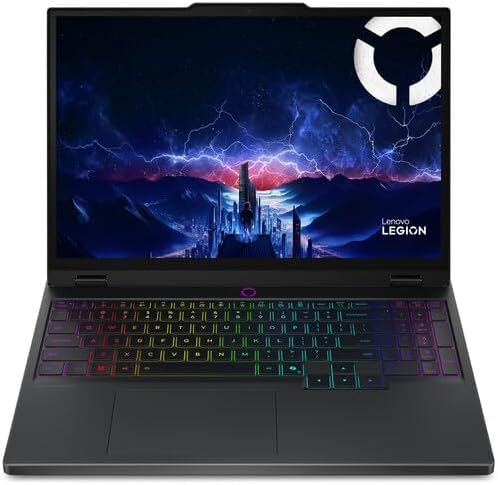
2. Lenovo Legion 5i Pro Gen 8

Don’t let the “gaming” label fool you; the Lenovo Legion 5i Pro is an engineering student’s secret weapon. It crams unbelievable power, a fantastic cooling system, and a god-tier keyboard into a body that’s way more low-key than its flashy gaming cousins. This thing is a pure workhorse.
The Legion 5i Pro is built to sustain high performance, often featuring a high-wattage NVIDIA RTX GPU and a beefy Intel Core i7 or i9 processor. This means your software will run smoothly without the laptop overheating and slowing down. Its 16-inch QHD+ display also has a buttery-smooth 165Hz refresh rate, making everything from coding to 3D modelling look fantastic.
Pros
- Top-Tier Performance: It handles the most intense engineering software you can throw at it, thanks to its powerful parts and great cooling.
- Great Keyboard: Lenovo keyboards are legendary for a reason. Your fingers will thank you during those long nights writing reports.
- Excellent Value: You get performance that can rival much more expensive professional workstations, but at a more student-friendly price.
Cons
- Battery Life: All that power is thirsty. You’ll want to keep your charger with you for long days on campus.
- Heavier and Bulkier: Portability is the trade-off here. It’s heavier and chunkier than the ultra-slim models.
3. ASUS Zenbook Pro Duo 14 OLED

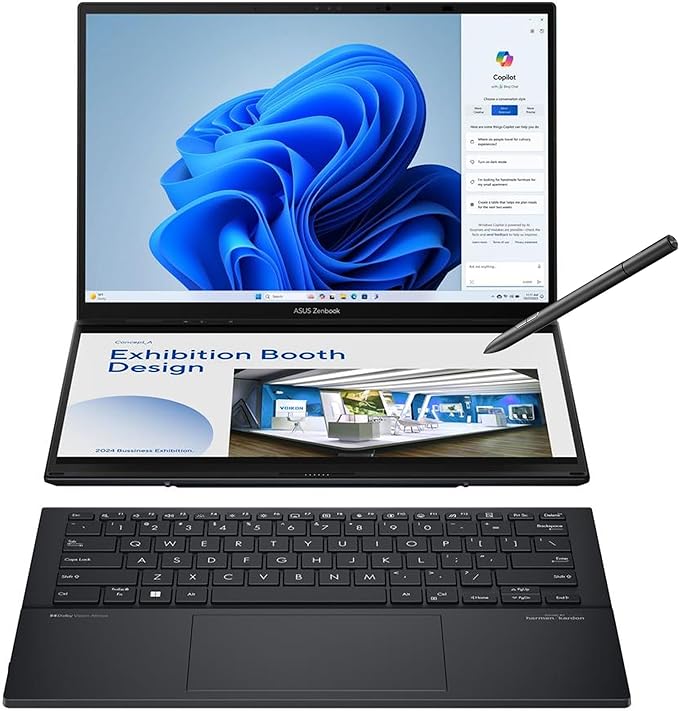
The ASUS Zenbook Pro Duo is for the serious multitasker. Its killer feature is the ScreenPad Plus, a second touchscreen that lives right above the keyboard. For an engineering student, this is a total game-changer. Imagine running AutoCAD on your main screen while your notes, formulas, or another program are sitting right below it.
This dual-screen beast is powered by an Intel Core i7 or i9 CPU and an NVIDIA GeForce RTX GPU, giving you plenty of horsepower. The main OLED display is simply gorgeous, with perfect blacks and vivid colours that make design work a joy. Having that extra screen space will genuinely change your workflow for the better.
Pros
- Dual-Screen Productivity: The ScreenPad Plus isn’t a gimmick; it’s incredibly useful for multitasking and boosts your efficiency.
- Gorgeous OLED Display: The main screen offers phenomenal colour accuracy, which is perfect for any visual-based engineering.
- Strong Performance: It has the guts to handle a demanding engineering workload without slowing you down.
Cons
- Unconventional Keyboard Layout: The keyboard and trackpad are pushed down to make room for the second screen, which takes some getting used to.
- Below-Average Battery Life: Powering two high-res screens absolutely tanks the battery.
To buy this product, click here.
4. HP Spectre x360 16 2-in-1

If you love flexibility, the HP Spectre x360 16 is a fantastic all-in-one package. It’s a 2-in-1, meaning you can use it as a normal laptop for typing reports and then flip it into a tablet for taking notes or sketching diagrams with the included pen. It’s perfect for students who want one device to do it all.
Even with its slim design, it’s got an Intel Core i7 processor and often an NVIDIA GeForce RTX graphics card. The huge 16-inch OLED touchscreen is responsive and beautiful, giving you a massive canvas for technical work. Plus, its premium design makes it feel like a truly high-end machine.
Pros
- Versatile 2-in-1 Design: Switching between laptop and tablet modes is super useful for lectures, labs, and study sessions.
- High-Quality Touchscreen: The big, vibrant display is brilliant for both work and kicking back to watch Netflix.
- Stylus Included: The pen comes in the box and is great for digital notes, marking up PDFs, or just doodling.
Cons
- GPU is Not Top-Tier: The graphics card is usually a lower-power version, so it might struggle with the most intense 3D rendering tasks.
- Glossy Screen: That beautiful screen can be a bit of a mirror in bright rooms, which can be distracting.
To buy this product, click here.

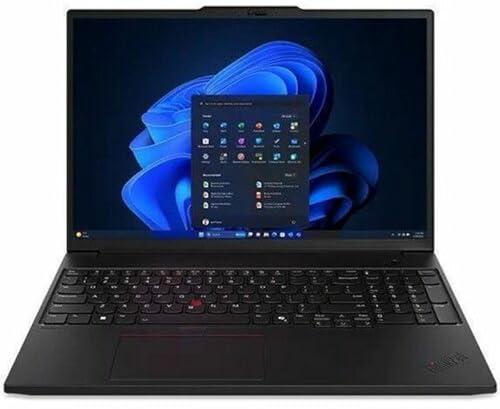
5. Lenovo ThinkPad P16s Gen 2

The ThinkPad name is legendary for a reason: insane reliability and the best keyboards in the business. The P16s is a mobile workstation built for people who just need their machine to work, no questions asked. It’s even ISV certified, which is a fancy way of saying it’s guaranteed to run key engineering programs from companies like Autodesk and Dassault Systèmes without any drama.
It runs an AMD Ryzen 7 PRO processor with integrated AMD Radeon graphics, making it great for CPU-heavy tasks and moderate CAD work. The P16s is all about endurance and a comfortable experience. Its 16-inch screen gives you plenty of room, and you could probably drop it down a flight of stairs and it would be fine (please don’t).
Pros
- Exceptional Durability and Reliability: ThinkPads are built like tanks and tested against military-grade standards.
- Best-in-Class Keyboard: The typing experience is second to none. If you write a lot of code or reports, this is a huge win.
- Software Certification: That ISV certification gives you peace of mind that your essential software will just work.
Cons
- Weaker Integrated Graphics: Without a powerful dedicated GPU, it’s not the best choice for majors that are heavy on 3D modelling and rendering.
- Utilitarian Design: It’s functional and professional but lacks the flashy, modern look of some other laptops.
To buy this product, click here.
6. Apple MacBook Pro 14 (M3 Pro)

With its own custom chips, the Apple MacBook Pro has become a serious powerhouse for engineering. The M3 Pro chip delivers mind-blowing speed and incredible power efficiency, which translates to battery life that lasts all day and then some. For students in computer science, software, or electrical engineering, this thing is an absolute weapon.
Its Liquid Retina XDR display is arguably the best screen on any laptop, period. The whole experience, from the build quality to the macOS operating system, is top-notch. But there’s a big catch: software compatibility.
Before you even think about buying a MacBook, you must check that all your required engineering software runs on macOS. Many core programs are still Windows-only, and while you can run Windows through Parallels, it’s an extra cost and hassle.
Pros
- Incredible Performance and Efficiency: The M3 Pro chip is insanely fast and sips power, giving you amazing performance and battery life.
- Best-in-Class Display and Speakers: The visual and audio experience is just on another level.
- Superb Build Quality: The solid aluminum body is both beautiful and tough as nails.
Cons
- Software Compatibility Issues: This is the big one. If your essential programs don’t run on macOS, this is a non-starter.
- High Cost: MacBooks are expensive, and repairs can cost a small fortune.

7. Acer Swift X 14

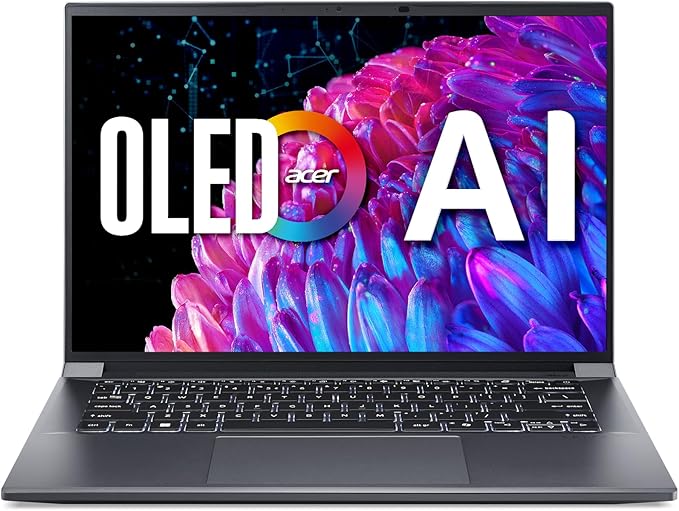
The Acer Swift X 14 hits that sweet spot between being easy to carry and powerful enough to get real work done. It manages to squeeze a dedicated NVIDIA GeForce RTX GPU into a pretty thin and light body, giving you the graphics power for CAD work without feeling like you’re lugging a brick around campus.
It’s powered by a modern Intel Core Ultra processor with some cool built-in AI features for efficient multitasking. But the real star is its 14.5-inch OLED screen, which makes everything look incredibly sharp and vibrant. Getting this kind of performance and portability at its price is pretty rare.
Pros
- Great Performance-to-Portability Ratio: You get a dedicated GPU in a lightweight package that’s easy to carry around all day.
- Beautiful OLED Screen: The high-resolution display is amazing to use, whether you’re working or watching movies.
- Competitive Pricing: It delivers strong performance and premium features for less money than many of its competitors.
Cons
- Can Run Hot Under Load: The slim design means it can get a bit toasty when you’re pushing it hard for a long time.
- Average Battery Life: It’s decent, but it won’t last as long as the ultra-efficient models when you’re doing heavy tasks.
To buy this product, click here.
8. Dell G16 Gaming Laptop

If you’re all about raw power on a tight budget, the Dell G16 Gaming Laptop is a monster value. It skips the fancy materials and slim designs and instead pours every dollar into the most powerful components you can get. This makes it an absolute bargain for engineering students who need maximum horsepower.
Inside, you’ll find a high-performance Intel Core i7 or i9 processor paired with a powerful NVIDIA RTX 40-series GPU. This thing will absolutely demolish any simulation, render, or complex calculation you can imagine. The 16-inch QHD+ high-refresh-rate display is also great for making sure everything looks smooth in your applications.
Pros
- Unbeatable Performance for the Price: You’re getting workstation-level power at a fraction of the cost.
- Excellent Cooling System: Its bulky body has room for big fans and heat pipes, so it rarely slows down due to heat.
- Easy to Upgrade: You can usually open it up to add more RAM or storage down the road pretty easily.
Cons
- Bulky and Heavy: This is the opposite of portable. You won’t enjoy carrying it around campus all day.
- Subpar Battery Life: You’ll be tethered to a power outlet most of the time.
To buy this product, click here.

9. Microsoft Surface Laptop Studio 2

The Microsoft Surface Laptop Studio 2 is easily the most versatile machine on this list. It has a wild hinge that lets the screen pull forward into a “stage mode” for watching videos or lay almost flat like a drafting table for drawing. This design is incredible for creative engineering students who do a lot of sketching.
It’s also a serious performer, with an Intel Core i7 CPU and an NVIDIA RTX 4050 or 4060 GPU. The haptic touchpad is one of the best you’ll find on any Windows laptop, and the overall build quality is outstanding. It’s like a workstation and a creative studio rolled into one.
Pros
- Unique and Versatile Hinge Design: The three modes (laptop, stage, studio) are genuinely useful for different types of work.
- Excellent Stylus Support: When paired with the Surface Slim Pen 2, it provides a fantastic digital drawing and writing experience.
- Strong Performance: It has more than enough power to handle demanding engineering software.
Cons
- Very Expensive: Its unique design and premium build come with a seriously high price tag.
- Heavier Than It Looks: It might look sleek, but it’s a dense and pretty heavy machine to carry around.
To buy this product, click here.

Matching Your Laptop To Your Engineering Major
Let’s be real: not all engineering fields are the same, and your laptop needs will vary wildly depending on your major. The beast of a machine a mechanical engineering student needs for 3D CAD work is complete overkill for a computer science major who lives in a code editor.
The trick is to match the hardware to your specific coursework. This stops you from splashing cash on a top-of-the-line graphics card you’ll never actually use. For some, a powerful GPU is non-negotiable. For others, that money is far better spent on a faster processor or more RAM. Getting this right is the key to not overspending.
Think of this flowchart as your quick guide to figuring out where your money should go, based on the software you’ll be using day in and day out.
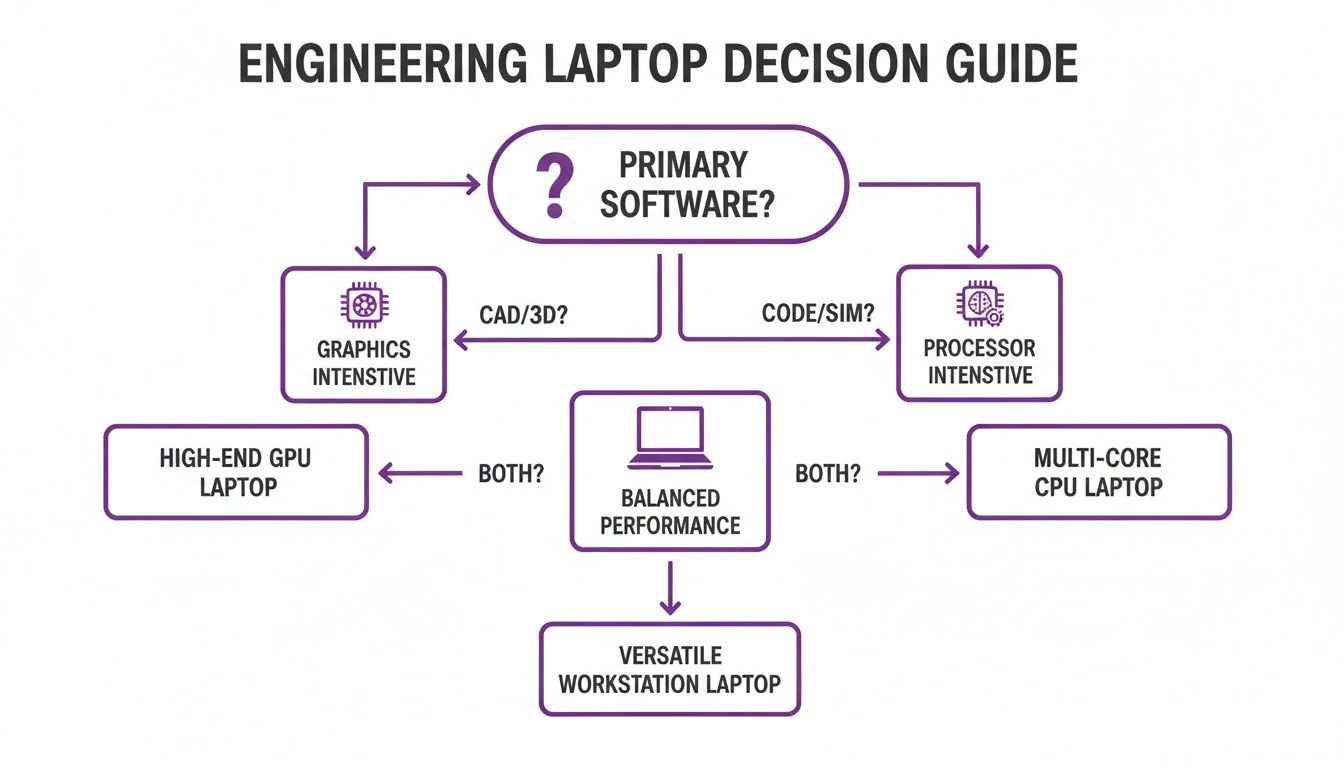
The takeaway is simple. If your degree is all about 3D modeling, put your money into the GPU. If you’re going to be running complex simulations and compiling code, the CPU and RAM are your best friends.
To make it even clearer, let’s break down which specs matter most for the different streams of engineering. Your major dictates your primary software, and that software has a favorite component it loves to lean on.
| Engineering Major | Primary Software | Most Important Spec | Secondary Spec |
|---|---|---|---|
| Mechanical, Aerospace, Civil | SOLIDWORKS, AutoCAD, CATIA | Dedicated GPU | Strong CPU |
| Electrical, Computer | MATLAB, SPICE, LabVIEW | Powerful CPU | Ample RAM |
| Software, Computer Science | IDEs (VS Code), Compilers | Powerful CPU | Ample RAM |
| Chemical, Biomedical | Aspen Plus, COMSOL, MATLAB | Powerful CPU | Ample RAM |
| Architectural | Revit, AutoCAD, SketchUp | Dedicated GPU | Ample RAM |
This table gives you a solid starting point. A civil engineering student and a computer science student have very different “most important” components, and spending your budget accordingly will make a world of difference to your daily productivity.
For The 3D Modelers And Designers
If you’re heading into Mechanical, Aerospace, Civil, or Architectural Engineering, get ready to live in 3D modeling software. Programs like SOLIDWORKS, Revit, and AutoCAD are visual beasts, and they absolutely devour graphics processing power.
Think of a strong Graphics Processing Unit (GPU)—like an NVIDIA GeForce RTX 3050 or better—as a specialized production line just for visuals. It lets you spin, zoom, and manipulate complex 3D models without lag. More importantly, it slashes your rendering times, turning what could be an agonizing multi-hour wait into a much quicker process. For these majors, the GPU is your number one priority.
For The Coders And Simulators
On the flip side, if you’re an Electrical, Computer, or Software Engineering student, your world is totally different. Your most intense tasks involve compiling huge chunks of code, running intricate circuit simulations, or crunching massive datasets. These jobs couldn’t care less about fancy graphics; they are all about raw processing power.
For these fields, you need to focus on:
- A powerful multi-core CPU: Look for an Intel Core i7/i9 or AMD Ryzen 7/9. This is the engine that will chew through complex calculations and let you multitask without your machine grinding to a halt.
- Plenty of RAM: 16GB is the new baseline, but 32GB is the sweet spot if you plan on running virtual machines or particularly demanding simulations.
For these majors, a high-end dedicated GPU is mostly dead weight. You can save a good chunk of change by choosing a laptop with solid integrated graphics. That frees up your budget to invest in a top-tier CPU and faster RAM, which will have a much bigger impact on your day-to-day work.
By figuring out what your primary software needs are first, you can make a smart decision that gets you the best possible performance for your money. You’ll end up with a laptop that feels like it was built just for your engineering journey.
Budgeting For The Right Laptop Without Overspending
Getting one of the best laptops for engineering students doesn’t mean you have to drain your savings account. With a few smart purchasing strategies, you can lock down a seriously powerful machine without the financial headache. The real trick is looking beyond the sticker price to figure out where you can save and how to get the most bang for your buck.
It’s all about playing the long game. A laptop that costs a bit more upfront but comes with a rock-solid warranty might save you hundreds in repair bills later on. You want to make your money work as hard for you as you do on your projects.
New Versus Refurbished Laptops
That new laptop smell is tempting, I get it. But certified refurbished models can be an absolute goldmine for value. These aren’t just random “used” devices; they’re professionally inspected, fixed up, and certified by the manufacturer (or a trusted seller) to work like new. They even come with a warranty.
- New Laptops: You’re getting the latest and greatest tech, a full manufacturer’s warranty, and that perfect, out-of-the-box experience. The only catch? You’re paying top dollar.
- Certified Refurbished: This is where you can snag a higher-spec machine for the price of a mid-range new one. It’s a fantastic way to afford more RAM or a better GPU, but just be aware that stock can be limited, and you might be getting a slightly older model.
Warranties And Customer Support
Think of your laptop as the most critical tool in your academic toolkit—a good warranty is your safety net. Most new laptops ship with a standard one-year warranty, but it’s always a good idea to see if you can extend it. For a device you’ll depend on daily for incredibly complex work, solid customer support and a no-fuss repair process offer priceless peace of mind.
A warranty isn’t just an extra cost; it’s insurance on your single most important academic investment. If a key component dies mid-semester, a good warranty is the difference between a small hiccup and a full-blown crisis.
Finding The Best Student Deals
Timing your purchase and knowing where to hunt for discounts are your two best weapons for saving big. The back-to-school season (July-September) and Black Friday are obviously huge for sales, but student-specific discounts are floating around all year long.
Heaps of top brands offer special educational pricing. For instance, you can often find a great Lenovo student discount that makes their powerful ThinkPad and Legion models way more affordable. This is where platforms like Student Wow Deals come in clutch, gathering all these offers in one spot so you don’t have to spend hours searching. By using these deals, you can get the performance you need without torching your budget—ensuring your finances are as efficient as your future engineering designs.
Essential Software And Operating System Choices
A beast of a laptop is only as good as the software it can run. That makes your choice of operating system (OS) a make-or-break decision right from the start. For engineering students, this almost always boils down to one classic debate: Windows versus macOS.
The honest truth is that the vast majority of essential engineering software—we’re talking everything from AutoCAD and SOLIDWORKS to super-specialized simulation packages—is built from the ground up for Windows. While some programs have Mac versions, many of the big ones simply don’t.
Before you even think about adding a laptop to your cart, you absolutely must check your university’s specific software requirements. Getting this wrong can lead to a world of compatibility headaches you just don’t need.
Windows vs macOS For Engineering
For most engineering fields, Windows is the safe bet. It’s the most direct path to running the widest range of applications your coursework will throw at you, guaranteed. MacBooks are powerful machines, no doubt, but they can create a serious hurdle when it comes to software compatibility.
Now, if your heart is truly set on a Mac, you’re not completely out of luck. You can often run Windows on a Mac using virtualization software like Parallels, but keep in mind this adds extra cost and can sometimes bog down performance. If you’re heading down this road, it’s a good idea to check out the Apple student discount to help soften the financial blow.
The bottom line is pretty simple: unless you’re a Computer Science major or have double-checked with your department that they fully support macOS, a Windows laptop is going to give you the most seamless and stress-free experience for your engineering degree.
Your Day-One Software Checklist
Kitting out your new laptop with the right software can get expensive fast, but you can slash those costs by hunting down student software deals. Beyond the paid programs, here are a few free essentials every engineering student should download on day one:
- A Versatile Code Editor: Visual Studio Code is a fantastic, lightweight tool for any coding you might have to do.
- Cloud Storage: Get Google Drive or Dropbox set up immediately to automatically back up your projects. Don’t learn this lesson the hard way.
- Note-Taking App: An app like OneNote or Notion is perfect for organizing lecture notes, messy formulas, and project ideas all in one place.
- Reference Manager: Trust me, Zotero or Mendeley will be your best friend when it comes to managing citations for big reports and research papers. They’re total lifesavers.
Got Questions? We’ve Got Answers
Picking the right tech can feel like its own engineering problem. Let’s break down some of the most common questions students have when they’re on the hunt for the perfect laptop.
Is 16GB Of RAM Really Enough For Engineering?
Short answer: Yes. For most engineering students, 16GB of RAM is the sweet spot.
Think of RAM as your laptop’s short-term memory or its workspace. It’s what allows you to run multiple demanding programs—like your CAD software, a compiler for your coding class, and a bunch of browser tabs for research—all at the same time without your machine grinding to a halt. While a beefy 32GB is great if you’re diving deep into complex 3D modeling, 16GB is more than enough to handle your undergraduate workload without breaking the bank.
Do I Actually Need A Dedicated Graphics Card?
This one really comes down to your major. If you’re studying Mechanical, Civil, or Aerospace engineering, you’ll be living in 3D modeling software like SOLIDWORKS or AutoCAD. For that kind of work, a dedicated graphics card isn’t just nice to have—it’s essential for a smooth, frustration-free experience.
On the flip side, if you’re in Electrical or Computer engineering, your software is usually more focused on processing power (the CPU) than visual rendering. In that case, you can often get by just fine with the integrated graphics that come with the processor, saving you a good chunk of cash.
Can I Get Through My Engineering Degree With A MacBook?
Tread carefully here. While MacBooks are fantastic machines, the world of specialized engineering software is still very much dominated by Windows. Many essential programs you’ll need simply don’t have a Mac version.
Before you even think about buying one, you absolutely must check with your university’s engineering department. They’ll tell you what software you’ll be using and whether they support macOS. You could try running Windows on a Mac using tools like Bootcamp or Parallels, but that can sometimes lead to annoying compatibility headaches you just don’t need mid-semester. Honestly, a Windows laptop is almost always the safer and easier choice for an engineering student.