



For most students, the iPad Air hits the sweet spot. It delivers a perfect blend of powerful performance, modern design, and real value for your money. It’ll handle everything from note-taking to more demanding apps without the hefty price tag of the Pro models, making it pretty much the ideal academic sidekick.
Choosing Your Ultimate Study Partner
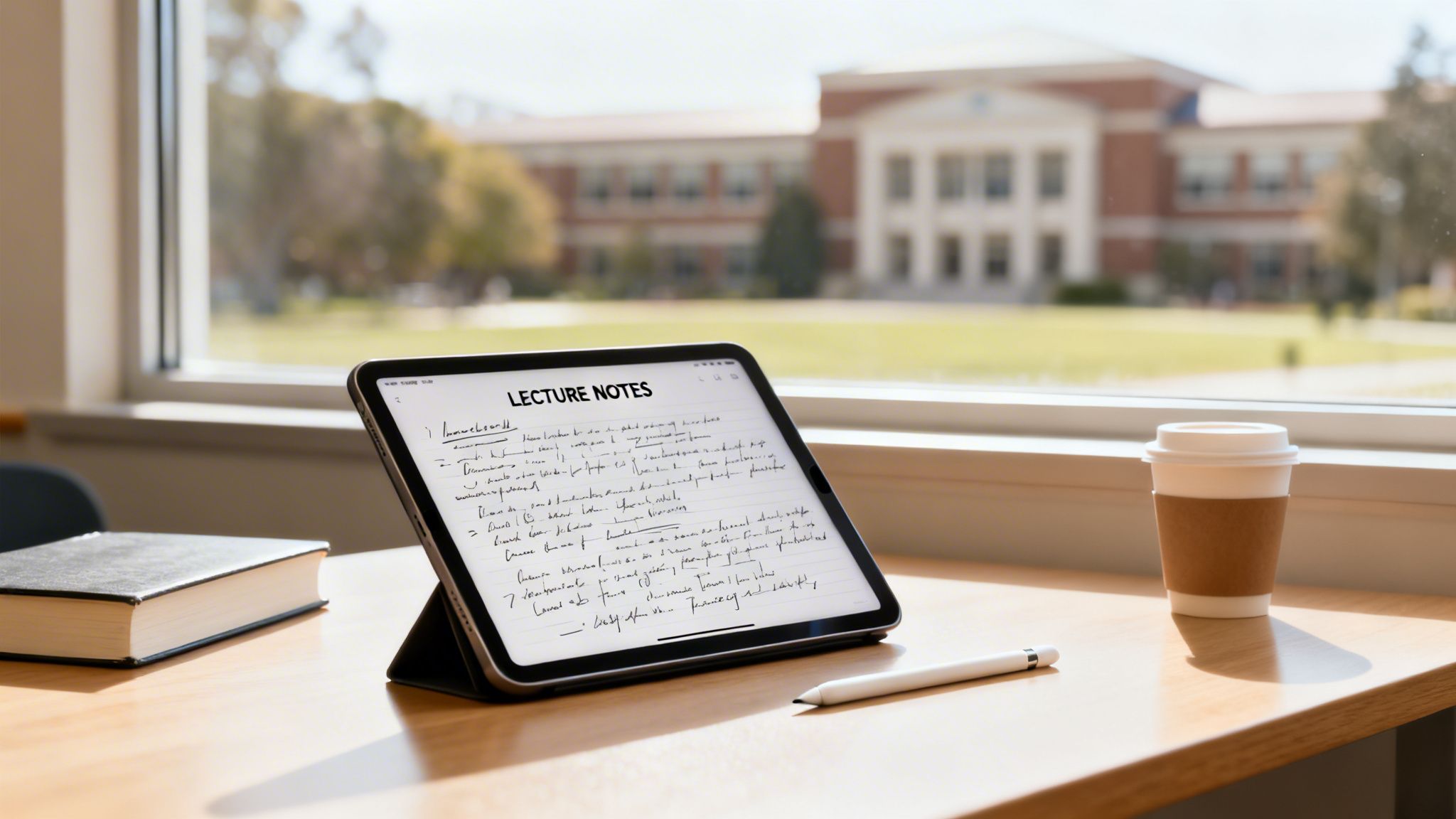
Let’s be honest, the iPad has become a campus essential. It’s replacing heavy textbooks, messy notebooks, and even clunky laptops for millions of students. Its magic lies in its versatility—you can annotate lecture slides one minute, sketch out a design concept the next, and even run specialized software for fields like engineering or medicine.
But with four main models all vying for your student loan, picking the right one can feel a bit much.
This guide is here to break down the entire iPad lineup from a student's point of view. We're going to skip the deep-dive tech jargon and focus on what actually matters for getting through your degree: real-world performance, which accessories you'll need, and getting the most bang for your buck.
Current iPad Models at a Glance for Students
To kick things off, let's get a quick lay of the land. This table gives you a snapshot of the current options, highlighting the key differences to help you narrow down your choices before we get into the nitty-gritty of each one.
| Model | Best For | Display Size | Processor | Apple Pencil Support | Starting Price |
|---|---|---|---|---|---|
| iPad (10th Gen) | Everyday tasks, note-taking, and media consumption on a budget. | 10.9-inch | A14 Bionic | 1st Gen & USB-C | $449 |
| iPad Mini | Ultimate portability, reading, and on-the-go annotations. | 8.3-inch | A15 Bionic | 2nd Gen | $499 |
| iPad Air | The best overall balance of power, features, and price for most students. | 11-inch / 13-inch | M2 Chip | 2nd Gen & Pro | $599 |
| iPad Pro | Demanding creative and technical work for specialized fields. | 11-inch / 13-inch | M4 Chip | 2nd Gen & Pro | $999 |
The iPad's dominance in education is no accident. In the second quarter of 2025, Apple locked down a massive 36.1% share of the global tablet market, shipping nearly 14 million units. This isn't just a popularity contest; it proves the iPad is a reliable tool with a rock-solid app ecosystem, making it the top choice for learners.
Platforms like Student Wow Deals, which has helped over 400,000 students since 2014, make this essential tech even more accessible by hunting down the best discounts.
Choosing an iPad isn't just about buying a tablet; it's about investing in a tool that can fundamentally change how you learn, organize, and create throughout your academic career.
Of course, the hardware is only half the battle. An iPad becomes truly powerful when you pair it with smart study habits. Figuring out the best way to study textbooks digitally can turn your device into an unstoppable learning machine. This guide will help you find the perfect iPad to build that system around your specific needs and budget.
Diving Deep: An iPad Comparison for Students
Picking the right iPad isn't just about grabbing the newest model. You need to look past the slick marketing and figure out how the tech specs actually help you in the real world of lectures, labs, and late-night study sessions. The question isn't "Which iPad is the best?" but "Which iPad is the best for you?"
Let's break down the real differences between the iPad (10th Gen), iPad Air, and iPad Pro. We'll focus on what truly matters for a student: the processor, the screen, and how easy it is to lug around campus.
Processor Performance: A Tale of Two Chips
The processor is the engine of your iPad, dictating how fast and smooth everything feels. For students, this really comes down to a simple question: how much power do you actually need?
iPad (10th Gen) with A14 Bionic Chip: This chip is more than capable of handling the daily student grind. We're talking about writing essays in Google Docs, juggling research tabs in Safari, streaming lectures, and taking notes in an app like Goodnotes. It's the reliable workhorse for all the essentials.
iPad Air with M2 Chip: The jump to the M2 is a big one. This is a desktop-class chip, and it makes the iPad Air feel unbelievably quick. If you’re a literature major who keeps dozens of research tabs, PDFs, and a word processor open at once, the M2 ensures you’ll never see a stutter.
iPad Pro with M4 Chip: Let's be honest—the M4 is overkill for most students. This level of power is built for professionals or students in super demanding fields. An engineering student running complex CAD software like Shapr3D or a film major editing 4K video will see a real difference, as the M4 chews through rendering tasks way faster than the M2.
For most undergrads, the A14 Bionic in the standard iPad is perfectly fine. But if you can stretch your budget, the M2 in the iPad Air offers a much smoother multitasking experience and will feel fast for years to come, making it a smarter long-term investment.
Display Technology: What Your Eyes Will Notice
The screen is what you’ll be staring at for hours on end, so the differences here really matter. It’s not just about size; it's about the tech behind the glass.
The standard iPad (10th Gen) has a bright and clear Liquid Retina display. It's great for watching videos and reading, but it isn't laminated. This means there’s a tiny air gap between the glass and the screen, which can create a slight hollow tapping sound and a bit of a disconnected feeling when using an Apple Pencil. For basic note-taking, it's not a dealbreaker, but digital artists might find it lacks precision.
The iPad Air also rocks a Liquid Retina display but adds two key upgrades. First, it's fully laminated, which gets rid of that air gap. This makes the Apple Pencil feel like it's writing directly on the pixels. It also has an anti-reflective coating—an absolute lifesaver when you're studying under the harsh fluorescent lights of the library.
The iPad Pro takes things to a whole other level with its Ultra Retina XDR display and ProMotion technology. This is where the Pro really earns its name.
For art students or anyone who takes a ton of handwritten notes, the ProMotion display on the iPad Pro is a game-changer. The 120Hz refresh rate makes the Apple Pencil feel incredibly smooth, and it makes scrolling through long PDFs and textbooks much easier on the eyes.
This higher refresh rate means the screen updates twice as fast as the Air's 60Hz display. When you're sketching or scribbling notes, the digital ink feels like it’s flowing directly from the Pencil’s tip with almost zero lag. If you plan on living on your iPad, this feature alone might be worth the extra cash.
Portability and Campus Life
Your iPad is going to live in your backpack, so size and weight are a bigger deal than you might think. Even small differences can impact how comfortable it is to carry across campus all day.
The iPad (10th Gen) and the 11-inch iPad Air are basically identical in size and weight. They are fantastic all-rounders—light enough that you'll forget they're in your bag and perfectly comfortable to hold for hours of reading.
The 13-inch iPad Air and 13-inch iPad Pro give you a much bigger canvas to work with, which can be a huge boost for productivity. Using Split View to have a textbook open right next to your notes feels way less cramped, almost like a proper laptop setup. But that extra screen space comes with extra weight and a larger footprint, making them a bit more of a hassle to carry and hold.
Ultimately, your choice here depends on your workflow. If you mainly need an iPad for taking notes in class and reading on the go, the 11-inch size is perfect. But if you see it becoming a laptop replacement for serious project work in your dorm, that extra space on the 13-inch models is a productivity boost that's hard to ignore.
Matching an iPad to Your Field of Study
The “best” iPad for uni isn’t a one-size-fits-all deal. Honestly, your major is the biggest factor in deciding which features go from being a cool extra to an absolute must-have. A STEM student running complex models has completely different needs than a humanities major buried in PDFs, and your iPad choice should reflect that.
Let's break down the ideal iPad for your specific academic path. We'll look at real-world scenarios to figure out which model’s strengths actually line up with your coursework. The goal is to make sure you invest in a tool that genuinely helps you, not just a fancy gadget that sits in your bag.
This decision tree is a great starting point. It’ll help you quickly see which way you should be leaning based on whether you just need a great note-taker or something that can handle pro-level apps.
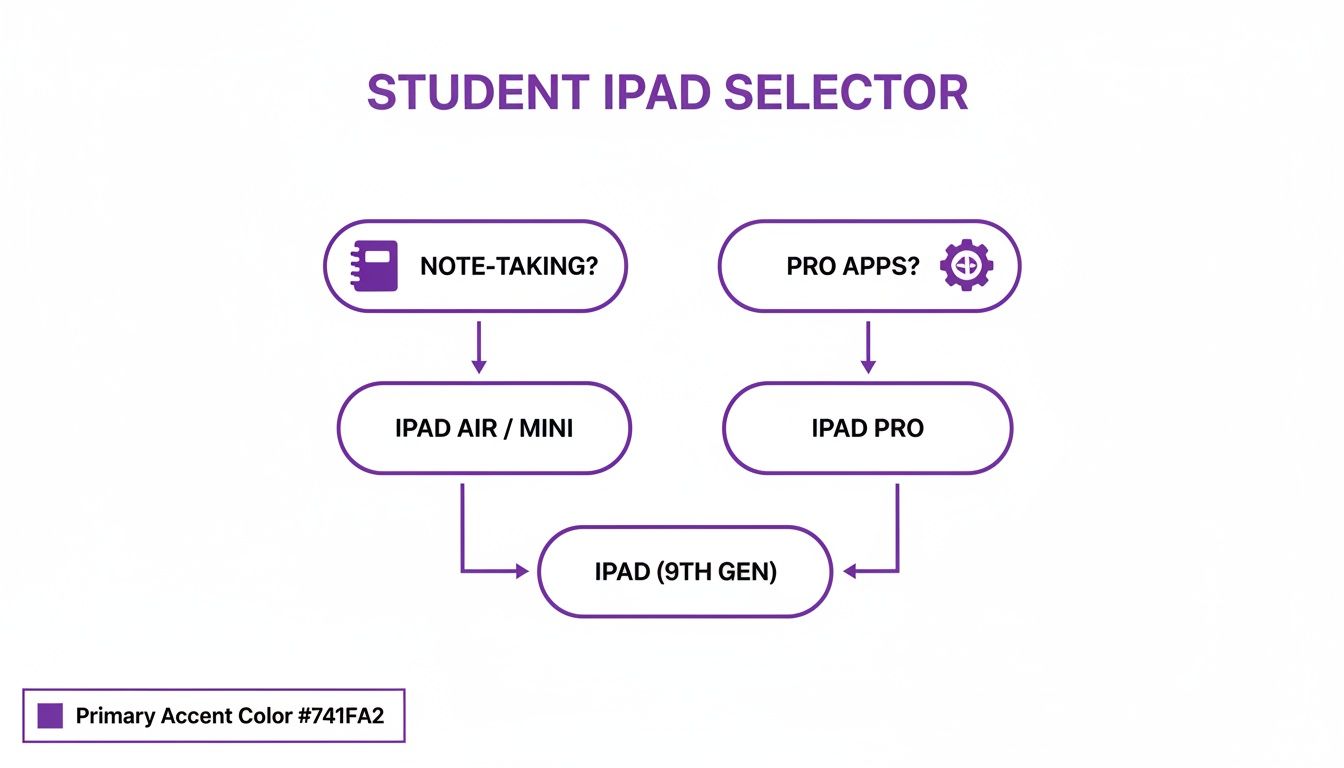
It really just boils down to one question: do you need the raw horsepower for specialised software, or a reliable workhorse for core uni tasks?
For STEM and Engineering Majors
If your degree involves 3D modeling, heavy data analysis, or running complex simulations, processing power is non-negotiable. This is where the iPad Pro and its M4 chip pull away from the pack. It's the clear frontrunner.
Apps like Shapr3D for CAD or MATLAB for computational work are resource hogs. The M4 chip runs these without breaking a sweat, so you avoid the frustrating lag that can kill your focus during lab work or a design session.
For STEM students, the combo of the Apple Pencil Pro and the iPad Pro's ProMotion display is huge. It delivers insane precision for annotating complex schematics and diagrams, feeling just as fluid and responsive as pen on paper.
Plus, the bigger 13-inch screen option is a massive advantage when you’re reviewing intricate models or juggling multiple data sets side-by-side. For STEM majors, the iPad Pro isn't a luxury; it’s a specialised tool that can actually keep up with your most demanding courses.
For Arts and Design Students
Creative fields are all about colour accuracy and a flawless drawing experience. The iPad Pro is again the top pick, but for totally different reasons.
Its Ultra Retina XDR display is phenomenal for colour accuracy and brightness, making sure your digital paintings or graphic designs look exactly how you envisioned them. When your grades depend on the quality of your visual work, that’s a big deal. The laminated screen also cuts down on parallax—that tiny gap between the Pencil tip and the screen—for a more natural, precise drawing feel.
The Pro’s power is also a lifesaver when you’re dealing with massive files in apps like Procreate or Adobe Fresco. Applying complex filters or managing dozens of layers happens instantly, so you can stay in your creative flow without interruption.
For Humanities and Liberal Arts Majors
If your days are spent reading articles, smashing out essays, and annotating PDFs, your priorities are different. You need comfort, portability, and good value—not raw power. The iPad Air is the perfect fit here.
With its M2 chip, it has more than enough grunt to handle serious multitasking. Think juggling dozens of Safari research tabs, a PDF of a primary source, and your notes app all at once. It does all this without the Pro's hefty price tag.
The Air supports the Apple Pencil Pro, turning it into a fantastic note-taking machine. It’s also incredibly light, making it easy to haul between the library, lecture halls, and your favourite coffee shop. For the vast majority of reading and writing-heavy courses, the Air has all the performance you'll ever need.
For Medical and Law Students
Students in med and law programs face a unique challenge: managing a mountain of dense information. Success often comes down to how quickly you can reference complex diagrams or digest massive case files.
This is where a bigger screen becomes a game-changer, making the 13-inch iPad Air or 13-inch iPad Pro excellent choices. That extra screen real estate is invaluable for reviewing detailed anatomical charts, looking at radiological images, or poring over hundreds of pages of legal text.
Being able to use Split View on a large display without feeling cramped is a huge win. You can have a digital textbook open on one side and your notes on the other, creating a super-efficient study setup that’s way better than lugging around a stack of heavy books.
The education tech market is booming, with a projected jump of USD 37.4 billion between 2024 and 2029. This just shows how much students and universities are relying on devices like the iPad. This trend, sped up by the shift to remote learning, proves how central tablets have become to modern academic life. You can find more insights on the education tech market growth on Technavio.
Choosing Your Essential iPad Accessories
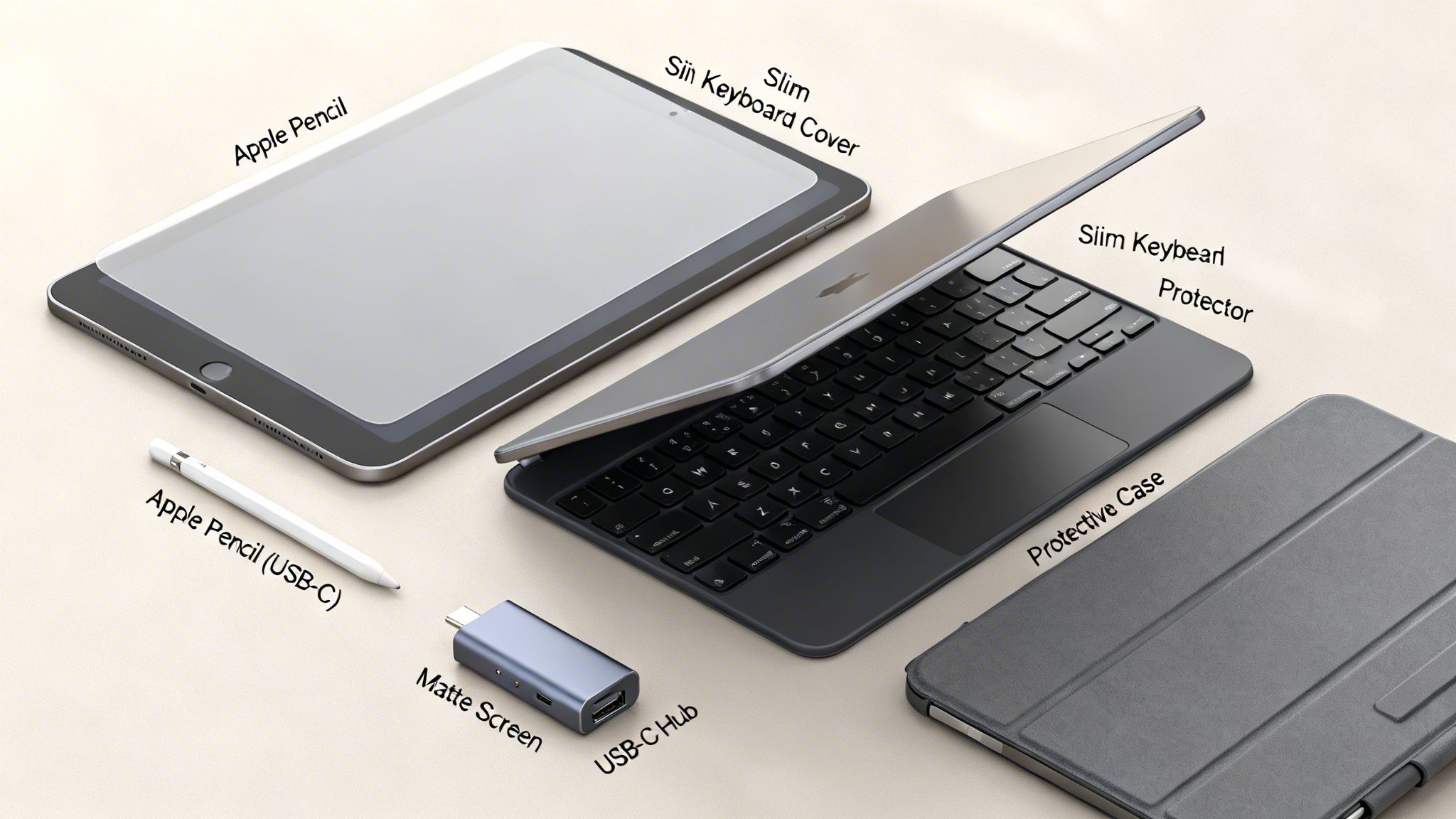
An iPad straight out of the box is a powerful slab of glass, but its true potential as a study tool only gets unlocked when you add the right gear. Accessories aren't just fancy extras; they're what transform your tablet from a Netflix machine into a serious productivity powerhouse.
But let's be real, the world of accessories is a confusing maze. Do you really need the priciest keyboard? Is the latest Apple Pencil worth the splurge? We'll break down the must-haves and nice-to-haves to help you build the ultimate student setup without blowing your budget.
Decoding the Apple Pencil Lineup
The Apple Pencil is, without a doubt, the most important accessory for any student. It’s what turns your iPad from a passive screen into an active tool for taking notes, marking up PDFs, and sketching out ideas. But not all Pencils are the same.
Apple Pencil (USB-C): This is your budget-friendly workhorse. It's perfect if you just need a solid stylus for basic note-taking and highlighting lecture slides. It snaps on magnetically but charges with a USB-C cable and skips pro features like pressure sensitivity.
Apple Pencil (2nd Gen): Here’s the sweet spot for most students. It charges wirelessly just by snapping onto the side of your iPad—a huge convenience. It also has pressure sensitivity (a must for digital artists) and a handy double-tap gesture for switching tools on the fly.
Apple Pencil Pro: This is the top-of-the-line option, and honestly, it’s probably overkill for most students. It adds cool features like a squeeze gesture, haptic feedback, and barrel roll for insane control over brushes. Awesome for art and design majors, but not necessary for everyday notes.
So, what's the verdict? For most students, the Apple Pencil (2nd Gen) hits the perfect balance of pro features and price. But if you’re just annotating readings, the USB-C model will do the job just fine and save you some cash.
Keyboards: From Basic to Pro
A physical keyboard is an absolute game-changer if you’re writing essays, cranking out emails, or doing any kind of serious typing. It basically turns your iPad into an ultra-portable laptop, but your options range from cheap and cheerful to eye-wateringly expensive.
Apple's Magic Keyboard is incredible, offering a brilliant typing experience, a trackpad, and that slick "floating" look. The catch? It costs a fortune and leaves the edges of your iPad completely exposed.
A much more practical and wallet-friendly pick for students is something like the Logitech Combo Touch. It delivers a similar high-quality typing feel with a trackpad but comes in a full protective case with a detachable keyboard and a kickstand. That versatility makes it a far better all-rounder for the chaos of student life.
Choosing a keyboard case often comes down to a trade-off between typing feel, protection, and price. For students, a durable, versatile case like Logitech's often provides better overall value than Apple's premium offering.
To make things a bit clearer, here's a quick showdown of the most popular accessories you'll be choosing between.
Student Accessory Showdown: Keyboards and Pencils
| Accessory | Key Feature | Best For | Compatibility | Price Point |
|---|---|---|---|---|
| Apple Pencil (2nd Gen) | Wireless charging & pressure sensitivity | All-around use, note-taking, digital art | iPad Pro, Air, mini | Mid-Range |
| Apple Pencil (USB-C) | Magnetic attachment & affordability | Basic note-taking and annotating | Most recent iPads with USB-C | Budget |
| Magic Keyboard | Premium typing feel & trackpad | Turning the iPad into a laptop | iPad Pro, Air | Premium |
| Logitech Combo Touch | Detachable keyboard & full protection | Versatility, protection, and typing | iPad Pro, Air, basic models | Mid-Range |
Ultimately, your choice depends on your budget and how you plan to use your iPad. The Logitech and 2nd Gen Pencil combo is a fantastic, versatile setup for almost any student.
Other Must-Have Student Accessories
Beyond the big two, a few other items can seriously level up your iPad game. Don't skip these!
Screen Protectors: A matte or "paper-like" screen protector is an amazing investment for heavy note-takers. It adds a slight texture that gives you more resistance and control with the Apple Pencil, making it feel way more natural. If you're more about watching movies in crisp HD, stick with a classic glossy tempered glass protector.
Durable Cases: Let's face it, your iPad is going to be tossed in a backpack and hauled all over campus. A tough case that covers the corners and back is non-negotiable. For serious, drop-proof protection, look into brands known for their durability. You can even find deals, so check out our guide on how to get an OtterBox student discount.
USB-C Hub: This little gadget is a lifesaver. If you need to connect to a projector for a presentation, plug in an external hard drive, or pull photos from an SD card, a USB-C hub is essential. It turns that one port on your iPad into a multi-tool for connecting just about anything.
Making Smart Buying Decisions
Alright, you've pinpointed the perfect iPad model. Now for the final few choices that can make or break your budget and how you actually use the thing. Picking the right storage, deciding on connectivity, and weighing up a warranty are the last hurdles.
Getting these details right is the difference between a device that feels like a seamless academic partner and one that causes headaches halfway through the semester. Let’s break down each option so you can configure the best iPad for your student life without overspending.
How Much Storage Is Enough?
Storage is one of those things where it's easy to cheap out and regret it later, or pay for way more than you'll ever need. For a student, your storage needs can grow surprisingly fast with lecture recordings, digital textbooks, and project files.
The base 64GB option looks tempting with its lower price tag, but honestly, it’s a risky choice for most students. Once you factor in the operating system and a few essential apps, that space vanishes quickly. You’ll find yourself constantly managing files and deleting apps, which is the last thing you want to deal with during exam season.
For the vast majority of students, 256GB is the sweet spot. It gives you plenty of room for all your apps, years of notes, thousands of PDFs, and even some offline movies for the commute, all without ever feeling cramped.
A 128GB option, if it’s available for your chosen model, can be a solid middle ground if your course load isn't super media-heavy. Terabyte-level storage? Complete overkill unless you’re a film student editing massive 4K video projects directly on your iPad.
Wi-Fi vs. Cellular Connectivity
Next up: do you need an internet connection everywhere you go? A Wi-Fi-only model is perfect if you’ll mostly use your iPad on campus, at home, or in cafes with decent Wi-Fi. It’s the more affordable route and works great for most students.
However, a Wi-Fi + Cellular model is a seriously worthwhile investment in a few key situations:
- Dodgy Campus Wi-Fi: If your university’s network is notoriously patchy, cellular ensures you can always access online resources without a hitch.
- Commuting Students: For anyone studying on the train or bus, a cellular connection turns that travel time into productive study time.
- Off-Campus Work: If you do fieldwork, internships, or just prefer studying in parks, having that built-in connection is a lifesaver.
Don't forget, you can also explore flexible data plans or just tether to your phone when you need to. Check out our guide on how a JB Hi-Fi student discount can help you save on new tech and data plans.
The AppleCare+ Question
Finally, should you get insurance? AppleCare+ is basically a two-year extended warranty that covers accidental damage—like a cracked screen from a drop in a crowded hallway. Since your iPad will likely live in a backpack and travel across campus daily, the risk of an accident is pretty real.
While it adds to the upfront cost, a single screen repair without AppleCare+ can be incredibly expensive. For the peace of mind alone, it’s a smart purchase for a device so central to your studies. The global tablet market is booming, with shipments expected to soar 9.8% to 162 million units in 2025, which just goes to show how vital these devices have become for students. You can read more about global tablet market trends on Omdia.
Finding the best student iPad is only half the battle. Getting it for the right price is just as important. Luckily, there are a few solid strategies to knock down the cost of this essential uni tool, so you can get the tech you need without totally draining your bank account.
The most obvious first stop is Apple’s Education Store. This is their special portal for students and teachers, offering year-round discounts on iPads, MacBooks, and some accessories. The savings might not seem massive—usually around $50–$100 off—but it’s a reliable and easy way to pay less than full price.
Unlocking Deeper Discounts
If you want to get a bit more savvy, Apple's Certified Refurbished store is a goldmine. Forget what you think you know about "used" tech; these devices go through a super strict refurbishment process. They get a full functionality test, any iffy parts are replaced with genuine Apple ones, and they're cleaned until they sparkle.
Every refurbished iPad comes with a brand-new battery and outer shell, plus the same one-year limited warranty you'd get with a device fresh off the factory line. It's basically a brand-new iPad for way less cash, which is a fantastic move for stretching your budget.
You should also keep an eye out for seasonal promos. Apple's big Back to School event, which usually runs over the summer, is famous for its extra goodies. In the past, they’ve thrown in free AirPods or gift cards on top of the student discount, which adds some serious value.
Don't just automatically buy straight from Apple. Heaps of other retailers and student-specific sites can offer way better discounts or bundle deals you won’t find anywhere else.
Maximizing Your Savings
To make sure you're really getting the best deal, you’ve got to look beyond Apple's own channels. Platforms built specifically for students can unlock even more savings.
- Student Discount Platforms: Websites like Student Wow Deals are made to pull together exclusive offers just for students. You can find unique discount codes for major tech retailers that might beat Apple's direct pricing or uncover promos you didn't even know existed.
- Retailer Promotions: Always check what major electronics stores are doing. They often run their own sales on Apple products, and sometimes you can even stack those with other student offers to get the best possible price.
By combining these tactics—checking the Education Store, keeping an eye on the Refurbished section, and using dedicated platforms—you can make that iPad purchase feel a lot more manageable. You can learn more about how to lock in an Apple student discount on Student Wow Deals to get started.
A Few Final Questions About iPads for Students
Alright, you've narrowed it down, but a few nagging questions might still be floating around. Let's tackle the common ones so you can click "buy" with total confidence.
Can an iPad Actually Replace My Laptop in College?
For a lot of students, especially if you're diving into humanities, arts, or social sciences, the answer is a surprisingly strong maybe. These days, iPadOS is a powerhouse, easily juggling research, multitasking between apps, and managing files. Slap on a Magic Keyboard, and an iPad Air or Pro can absolutely crush your essays and presentations.
But—and this is a big but—if your degree is in something more specialised like computer science, engineering, or heavy video production, you'll probably hit a wall. There's some essential, desktop-only software that just doesn't have an iPad equivalent. Think of it as an incredible sidekick, but maybe not the main hero for every single degree.
An iPad is a master of versatility for 90% of university tasks. But for that final 10% of specialized, desktop-only software, you'll still need access to a traditional laptop or Mac.
How Many Years Will a New iPad Last Me?
You can absolutely bank on a new iPad lasting your entire four-year degree and probably a good while after. Apple is fantastic with software support, typically pushing out iPadOS updates for five to seven years after a model comes out. That keeps your device secure and running all the latest apps you'll need.
Sure, the battery will lose a bit of its oomph over time, but for core uni work like note-taking, reading textbooks, and research, its performance will stay rock-solid for years. It's a genuinely good long-term investment for your studies.
Is the iPad Mini a Good Choice for Taking Notes?
Look, the iPad Mini is brilliant for being super portable and for reading on the bus or in a cafe. But when it comes to serious, non-stop note-taking during a lecture, that smaller 8.3-inch screen can feel pretty cramped.
It's perfect for quick annotations on a PDF or jotting down a few thoughts. However, if handwriting your notes is your main game, you'll have a much better time with the bigger canvas on the iPad Air or the standard iPad. Trust me, the extra screen real estate makes a world of difference.
Find the latest and greatest student discounts on Apple products and essential tech at Student Wow Deals. Start saving today by visiting https://studentwowdeals.com.